WIN Student Goal Tracker
April 2026
1. Project Description
The WIN Student Goal Tracker is a web-based case management system designed to support organizations working with adults with special needs. The platform enables staff to track student goals, document services, and log critical incidents while maintaining strong privacy, auditability, and compliance with FERPA, IDEA, and FAPE.
The system is designed with sustainability in mind, ensuring that future developers can easily maintain, extend, and redeploy the application.
2. Architecture
Technology Stack & Infrastructure
Architecture Description
- Presentation Layer (Angular)
- Application Layer (.NET API)
- Data Layer (MySQL)
Traefik manages routing and HTTPS traffic.
3. Data Flow
Each scenario lists the UI file that initiates the action, the Angular service method called, the API endpoint hit, the .NET controller and repository method invoked, and the stored procedure that reads or writes the database.
1 — User Login
2 — View My Students (Home Dashboard)
3 — Open Student Workspace (Full Profile)
4 — Create Goal
5 — Log Progress Event
4. Recommended Hosting
- The entire application is currently hosted online with Hetzner (www.hetzner.com), on a plan donated by team members. The team has committed to hosting for at least the next two years, and if/when that changes, will help the partner transition to the hosting platform of their choice.
5. Application Installation
The application is composed of three moving parts — an Angular 20 SPA (ui/winstudentgoaltracker),
a .NET 9 Web API (api/), and a MySQL 8 database initialised from the SQL objects in
db/Objects/. Configuration for every tier is read from a single .env file at the
repository root. Two workflows are supported: running the stack directly on a developer workstation, or
deploying the full stack to a server with docker compose behind an existing Traefik reverse
proxy.
5.1 Local Development Environment
The recommended local workflow runs MySQL in Docker (so the schema initialises itself from
db/docker-init/01-schema.sh) while the API and UI run on the host for fast iteration and
debugging.
Prerequisites
- Node.js 22+ and npm — to run the Angular CLI
- .NET 9 SDK — to build and run the API
- Docker Desktop (or Docker Engine + Compose plugin) — to run MySQL
- Git — to clone the repository
Step 1 — Clone and create .env
Clone the repository and create a .env file at the project root. The API reads it via
DotNetEnv (which traverses parent directories), the UI/API containers read it through
docker-compose.yml's env_file directive, and the MySQL container consumes the
MYSQL_* variables natively.
git clone <repo-url> WinStudentGoalTracker
cd WinStudentGoalTracker
Create .env with the following keys (replace the secrets before sharing or deploying):
# MySQL container bootstrap
MYSQL_ROOT_PASSWORD=change_me_root
MYSQL_DATABASE=winstudentgoaltracker
MYSQL_USER=appuser
MYSQL_PASSWORD=change_me_app

# Connection used by the .NET API
MYSQL_HOST=127.0.0.1
MYSQL_PORT=3309
# (the api falls back to root/no-password if MYSQL_USER/PASSWORD are omitted)

# JWT signing key — must be >= 32 bytes
JWT_KEY=replace_with_a_long_random_string_at_least_32_chars
.env is listed in .gitignore; never commit it. For local dev, point
MYSQL_HOST at 127.0.0.1 so the host-side API can reach the containerised MySQL
through the published port 3309.
Step 2 — Start MySQL
Bring up only the database service from the root compose file. On first run it creates the volume, creates
the database and application user, and executes db/docker-init/01-schema.sh which loads tables,
functions, views, and stored procedures from db/Objects/ in the correct order.
docker compose up -d mysql
docker compose logs -f mysql   # watch for "Schema initialization complete"
MySQL is exposed on host port 3309 (mapped to container port 3306). To reset the
database during development, stop the container and remove the named volume:
docker compose down && docker volume rm winstudentgoaltracker_win_mysql_data.
Step 3 — Run the API
cd api
dotnet restore
dotnet run
The API listens on http://localhost:5000 (and https://localhost:5001) by default
via Kestrel. Swagger UI is available at /swagger when running in the
Development environment (the default for dotnet run). On startup the console
prints the resolved MySQL connection string — verify it points at 127.0.0.1:3309 and the
database name from your .env.
Step 4 — Run the UI
cd ui/winstudentgoaltracker
npm install
npm start
The Angular dev server starts on http://localhost:4200. The base URL the UI calls is defined in
src/environments/environment.development.ts. For a fully local stack, edit that file so
apiBaseUrl points at your locally running API (e.g. http://localhost:5000) instead
of the deployed https://winapi.opelly.me. The API's CORS policy already allows any origin in
development.
Step 5 — Seed a user
The schema initialises empty. To sign in, insert at least one user, one
school_district, one program, and a user_program row linking the user
to the program with a role. Passwords are hashed with PBKDF2 by PasswordHasher; the simplest
path is to use an existing seeded dump (ask a team member for seed.sql) or register via a
super_admin account using the admin endpoints.
5.2 Production Deployment (Docker Compose + Traefik)
Production deploys all four tiers — MySQL, .NET API, Nginx-served Angular build, and the Traefik reverse
proxy — as Docker containers on a single VPS. The repository's docker-compose.yml brings up
MySQL, the API, and the UI; Traefik runs in a separate compose stack on the same host and
publishes ports 80/443 for the whole server. The two stacks communicate through an external Docker network
named web.
Prerequisites on the server
- Linux VPS with Docker Engine and the Compose plugin installed
- Ports 80 and 443 open on the server's firewall
- Two DNS
Arecords pointing at the server's public IP:win.<your-domain>(UI) andwinapi.<your-domain>(API) - A working Traefik stack on the host (see next section)
Setting up Traefik (one-time)
Traefik is the edge router that terminates TLS, requests Let's Encrypt certificates, and forwards traffic to
the correct container based on the Host() rule. The WIN compose file assumes Traefik is already
running on the host and configured with:
- An external Docker network named
webthat Traefik is attached to. The application's UI and API containers join this network so Traefik can reach them.docker network create web - An entrypoint named
websecurelistening on:443(and typically a redirect from:80). - A certificate resolver named
letsencrypt(ACME, HTTP or DNS challenge) configured with an email and a persistentacme.jsonvolume. - Two file-provider middlewares referenced by the labels in
docker-compose.yml:gzip@file(compression) andsecurity-headers@file(HSTS, frame-deny, etc.).
A minimal Traefik docker-compose.yml typically lives in /opt/traefik/ alongside a
traefik.yml static config (declaring the entrypoints, providers, and ACME resolver) and a
dynamic/ directory containing the gzip and security-headers
middleware definitions. Traefik's official documentation at
doc.traefik.io covers this setup in detail — the WIN stack
does not prescribe a specific Traefik configuration, it only requires that the network, entrypoint, cert
resolver, and middleware names above exist.
Step 1 — Prepare the repository on the server
git clone <repo-url> /opt/winstudentgoaltracker
cd /opt/winstudentgoaltracker
Step 2 — Populate .env
Same keys as the local workflow, but with production-safe values. For the containerised deployment,
MYSQL_HOST must be the service name mysql (the API container resolves it over the
internal backend Docker network) and MYSQL_PORT must be 3306 (the
container's internal port, not the host-mapped 3309):
MYSQL_ROOT_PASSWORD=<strong-random>
MYSQL_DATABASE=winstudentgoaltracker
MYSQL_USER=appuser
MYSQL_PASSWORD=<strong-random>
MYSQL_HOST=mysql
MYSQL_PORT=3306
JWT_KEY=<32+ byte random secret>
Step 3 — Update domain labels (if not using opelly.me)
docker-compose.yml hard-codes the Traefik Host() rules
winapi.opelly.me and win.opelly.me. Edit those two labels to match your DNS
records before bringing the stack up. The UI also points at https://winapi.opelly.me via
src/environments/environment.ts; update that file and rebuild the UI image so the browser calls
your API host.
Step 4 — Build and start the stack
docker compose up -d --buildThis creates:
winstudent-mysql— MySQL 8 on the internalbackendnetwork, volumewin_mysql_data, schema loaded on first start.winstudent-api— .NET 9 API on port8005, attached to bothbackend(to reach MySQL) andweb(to be reached by Traefik). Published atwinapi.<your-domain>over HTTPS.winstudent-ui— Angular build served by Nginx on port8006, attached toweb. Published atwin.<your-domain>over HTTPS.
Traefik picks up the new containers automatically via its Docker provider, requests TLS certificates from
Let's Encrypt on first request, and begins routing traffic. Confirm with
docker compose ps (all services healthy/running) and
docker compose logs -f api (look for the Kestrel startup line and the printed connection
string).
Step 5 — Verify
- Visit
https://win.<your-domain>— the login page should load over HTTPS with a valid Let's Encrypt certificate. - Visit
https://winapi.<your-domain>/swagger— should return 404 in production (Swagger is only enabled inDevelopment); a 404 from the API itself confirms routing works. - Sign in with a seeded user and check
docker compose logs apifor successful/api/Auth/Loginrequests.
Updating a running deployment
cd /opt/winstudentgoaltracker
git pull
docker compose up -d --build    # rebuilds changed images and recreates containers
docker compose logs -f
MySQL is not rebuilt by --build (it uses the upstream image) and its volume
persists across up/down cycles, so data survives code deployments. Schema
migrations should be applied by running the appropriate SQL files from db/migrations/ against
the running MySQL container; see section 7 for backup procedures before running migrations.
6. Authentication & Authorization
JWT-based authentication with refresh tokens.
Key files: AuthController.cs, JwtService.cs, middleware
7. Database Backup
Backup
mysqldump -u username -p dbname > backup.sqlRestore
mysql -u username -p dbname < backup.sqlFrom the UI
Administrators may back up the database via the "Backup" button in the Administrator panel
8. Environment Variables
DB_CONNECTION=...
JWT_SECRET=...
JWT_EXPIRATION=3600
Ensure .env is in .gitignore.
9. Partner Statement
The partner representatives Polly Balsillie and Fred Winter have reviewed the developer documentation and understands its scope and purpose.
Date: April 16, 2026
10. Installation Walkthrough Statement
N/A. An installation walkthrough was not appropriate for the partner, as they are non-technical. They are primarily users of the application, and at least two of our team members will continue to make ourselves available to support the application.
Date: April 16, 2026
11. Performance & UX Analysis
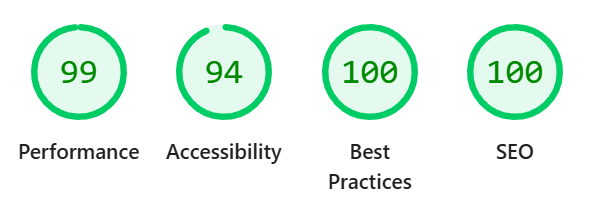
Lighthouse Results

Form Factor Analysis
- Mobile Portrait: Fully responsive and functional
- Mobile Landscape: Improved readability and layout
- Desktop: Optimal user experience
UX Observations
Clean navigation with consistent user workflows across devices.
Responsive Accessible High Performance SEO Ready12. Known Liabilities & Improvements
Issues: Potential performance scaling and mobile optimization opportunities
Improvements: Lazy loading, bundle optimization, responsive enhancements
13. Sustainability Considerations
Docker deployment, free-tier hosting, and modular design support long-term maintainability.
Appendix A – ERD
The system includes a structured relational database supporting users, roles, permissions, programs, students, goals, progress tracking, and incident logging. The interactive diagram below shows all 17 tables and their relationships. Drag tables to rearrange, scroll to zoom, and hover a table to highlight its connections.
Open full-page ERD⬡ ERD
Appendix B – Repository Structure
WinStudentGoalTracker/
├── api/                    .NET 9 backend — controllers, services, repositories, Dockerfile
├── db/                     MySQL schema and stored procedures; docker-init scripts for container startup
├── docs/                   HTML documentation (technical spec, user manual, ERD, architecture, API)
├── ui/                     Angular 20 frontend SPA
├── prototype/              Early role-assignment prototypes (not production code)
├── docker-compose.yml      Orchestrates API, Angular/Nginx, MySQL, and Traefik containers
└── WinStudentGoalTracker.sln  Visual Studio solution file
Appendix C – Architecture Overview
High-level diagrams of the system tiers, two-phase auth flow, data model, role hierarchy, deployment, and key design decisions.
Open full-page Architecture Overview- TypeScript 5.8 + SCSS
- Angular Signals (state)
- Lazy-loaded routes
- JWT auth interceptor
- Proactive token refresh
- Home / Workspace
- Student detail view
- Goal & Benchmark modals
- Progress event modals
- Report generation UI
- Admin panel
- Student card list
- Add progress event
- Toggle benchmark
- AuthService (signals)
- ApiService (HTTP)
- StudentService
- AdminService
- ReportPromptService
- PlatformService
- win.opelly.me → Angular (Nginx :8006)
- winapi.opelly.me → API (:8005)
- Let's Encrypt TLS
- Gzip compression
- Security headers
- JWT authentication middleware
- Swagger / OpenAPI
- CORS policy
- Dependency injection
- /api/Auth — login & tokens
- /api/Student — CRUD
- /api/Admin — district/users
- /api/ReportPrompt — prompts
- TokenService (JWT)
- PermissionService
- PasswordHasher (PBKDF2)
- RecommendationService
- TranscriptionService
- ProgressReportBuilder
- StudentRepository
- UserRepository
- AuthRepository
- AdminRepository
- ReportPromptRepository
- winstudentgoaltracker DB
- 17 tables
- 51 stored procedures
- Initialised from db/docker-init/
- user, school_district, program
- user_program (roles junction)
- student, user_student
- goal (recursive), benchmark
- progress_event + junction
- refresh_token
- sp_Student_* (CRUD)
- sp_Goal_* / sp_Benchmark_*
- sp_ProgressEvent_*
- sp_RefreshToken_*
- sp_Program_* / sp_User_*
- sp_ProgressReport_*
- llm.opelly.me
- Model: gemma4:e2b
- Benchmark recommendations
- 5-min timeout
- stt.opelly.me
- Speech-to-text transcription
- Progress event dictation
- 5-min timeout
POST /api/Auth/Login
+ program list
Stored in localStorage
POST /api/Auth/SelectProgram
Refresh token (30 days)
JWT includes role + program_id
Auth interceptor injects token
POST /api/Auth/RefreshToken
Rotated refresh token returned
auth_jwt, auth_refresh_token,
auth_session_token — all in localStorage.
|
401 interceptor: attempts one silent refresh; if that fails, redirects to
/login.
|
Refresh token rotation: each use replaces the old token (tracked via
replaced_by_token_id).
| Entity / Action | super_admin | district_admin | program_admin | teacher | paraeducator |
|---|---|---|---|---|---|
| Student — Create | Allow | Allow | Allow | Allow | Deny |
| Student — Update | Allow | Allow | Allow | Mine | Deny |
| Goal — Create | Allow | Allow | Allow | Mine | Deny |
| Goal — Update | Allow | Allow | Allow | Mine | Deny |
| ProgressEvent — Create | Allow | Allow | Allow | Allow | Mine |
| ProgressEvent — Delete | Allow | Allow | Allow | Mine | Deny |
| Program — Create | Allow | Mine | Deny | Deny | Deny |
| User — Create | Allow | Mine | Mine | Deny | Deny |
Docker Containers
- mysql:8 (port 3309)
- .NET API (port 8005)
- Angular / Nginx (port 8006)
- Traefik reverse proxy
Docker Networks
- web — external HTTPS routing
- backend — internal service mesh
- API depends on MySQL healthcheck
- UI depends on API (build time)
Environment Config
- MYSQL_ROOT_PASSWORD
- MYSQL_DATABASE / USER / PASSWORD
- JWT_KEY (signing secret)
- MYSQL_HOST / PORT
Frontend Environments
- Dev: localhost:5000 (API)
- Prod: winapi.opelly.me (API)
- Served by Nginx in production
- Angular CLI dev server locally
DB Initialisation
- Schemas from db/docker-init/
- 51 stored procedures
- Health check gates API startup
- No ORM migrations — raw SQL
AI / External Services
- Ollama LLM — llm.opelly.me
- STT service — stt.opelly.me
- Both called from API tier only
- 5-minute timeout on both
Two-Phase JWT Auth
- Phase 1: credentials → session token
- Phase 2: program select → scoped JWT
- Prevents data leakage before program chosen
- JWT scoped to one program at a time
Refresh Token Rotation
- New token issued on each refresh
- Old token replaced (not deleted)
- Genealogy tracked via replaced_by
- Prevents replay attacks
Program-Scoped Multi-Tenancy
- JWT contains program_id claim
- All queries filtered by program
- district_admin scoped to district
- super_admin bypasses scope
Dapper + Stored Procedures
- No ORM (Entity Framework)
- Business logic close to data
- Dapper maps rows to C# objects
- 51 procedures for full coverage
Angular Signals (not RxJS)
- Auth state as reactive signals
- Computed signals derive user context
- Simpler than Observable chains
- Auto-update dependent UI
Centralised Permission Matrix
- Declarative rules per entity + action
- Allow / MineOnly / Deny granularity
- Evaluated at request time in API
- Single source of truth for authz